How to Packaging Design: A 9-Step Guide for Brands (2026)
Your product can be excellent and still lose to a competitor on the shelf. Customers decide in seconds, and the package is what they see first. If you are searching for how to packaging design the right way, this guide covers the full process in the order professional designers work.
It covers research, structure, colour, typography, mockups and print production. It works whether you are a startup launching your first product or an established brand refreshing a range.
In this guide:
- What is packaging design?
- Step 1: Define your brand and product
- Step 2: Research customers and competitors
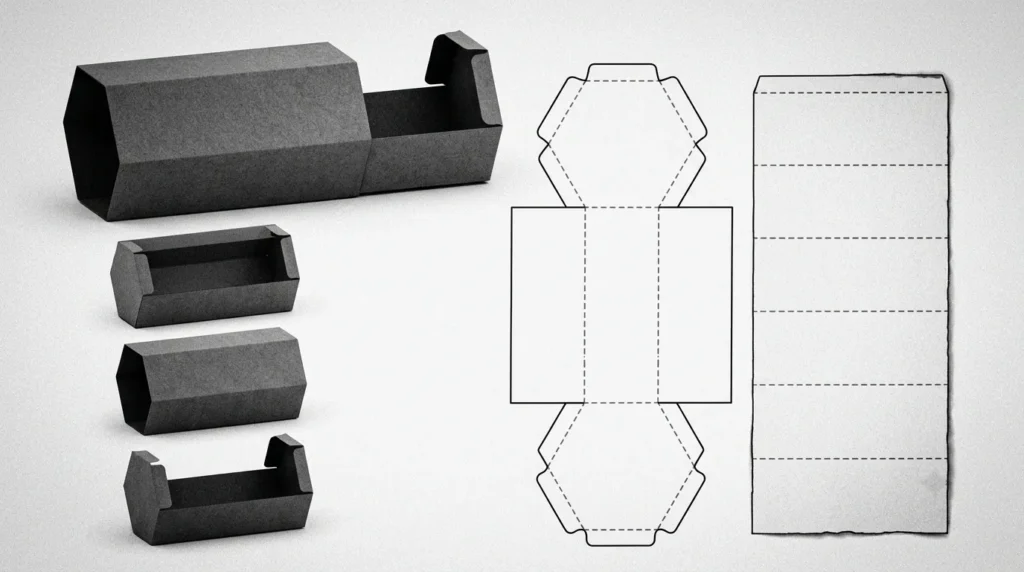
- Step 3: Choose the packaging structure and material
- Step 4: Build the dieline
- Step 5: Pick colours, typography and imagery
- Step 6: Add the mandatory label information
- Step 7: Create mockups and test
- Step 8: Prepare print-ready files
- Step 9: Print a proof and launch
- Common mistakes
- FAQs
What Is Packaging Design?
Packaging design is the process of planning the shape, structure, graphics and information of a product’s package. It combines three things:
- Structural design: the box, pouch, bottle or tube.
- Graphic design: colours, logo, typography and imagery.
- Information design: ingredients, usage, barcodes and legal text.
Good packaging protects the product, communicates your brand and persuades people to buy. It is part of your brand identity, not a separate task.
Step 1: Define Your Brand and Product
Before you open any design software, answer these questions:
- Who is the product for?
- What price segment is it in: budget, mid-range or premium?
- What three words should the package make people feel?
- What makes this product different?
If your brand foundations are unclear, fix them first. Our guide on brand strategy for startups walks through positioning, voice and audience. Packaging built on a vague brand always looks generic.
Step 2: Research Customers and Competitors
Go to a store, or browse the marketplace listings, where your product will sit. Photograph 10 to 15 competing products and note:
- Dominant colours in the category
- Common shapes and materials
- How much text appears on the front
- What looks cheap and what looks premium
Then decide where to fit in (so shoppers understand the category) and where to stand out (so they notice you). Browse Dieline for global packaging inspiration and category trends.
Step 3: Choose the Packaging Structure and Material
Your structure affects cost, protection, shipping and the unboxing experience. Common options:
| Packaging type | Best for | Typical materials |
| Folding carton | Cosmetics, supplements, small electronics | SBS board, kraft board |
| Rigid box | Jewellery, gifting, luxury goods | Greyboard with wrap paper |
| Corrugated box | E-commerce, shipping | E-flute, B-flute board |
| Pouch / sachet | Food, spices, powders | Laminated film, kraft with liner |
| Bottle / jar | Liquids, creams, pickles | Glass, PET, HDPE |
| Tube | Gels, creams | Plastic, aluminium |
Ask your printer or packaging supplier about minimum order quantities, lead times and sustainable options before you finalise the design.
Step 4: Build the Dieline
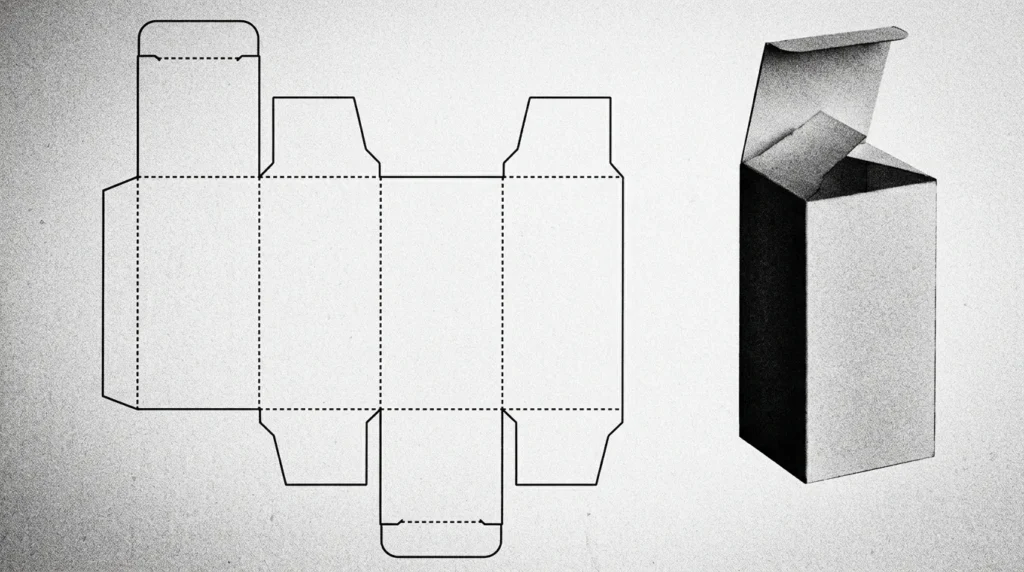
A dieline is the flat, 2D template of your package, showing every cut, fold and glue area. Your artwork must sit exactly on it.
- Get the dieline from your packaging manufacturer, or create one in Adobe Illustrator.
- Mark the bleed (usually 3 mm), the safe zone and the fold lines.
- Keep logos and text away from folds and edges.
Skipping the dieline is the most common reason for misaligned prints.
Step 5: Pick Colours, Typography and Imagery
Colour
Colour sets the emotion of the pack within a second. Green suggests natural or organic, black and gold suggest premium, and bright orange suggests energy. Choose a limited palette of 2 to 4 colours, and see our colour theory basics guide for building one. If you print to a brand colour, specify a Pantone reference so it stays consistent across batches.
Typography
- Use one display font for the product name and one clean font for details.
- Make the product name readable from about 1 metre away.
- Keep small text at 6 pt or larger for print legibility.
Imagery and Illustration
Use photos only when they add trust, such as food or skincare textures. Otherwise, custom illustrations or patterns make a pack more ownable. If you plan a 3D render for the pack or ad creative, read what is 3D design.
Hierarchy
Design the front panel in this order of importance:
- Brand name or logo
- Product name and variant
- One key benefit
- Net quantity
If everything is loud, nothing is noticed.
Step 6: Add the Mandatory Label Information
Packaging must carry legally required information, and this varies by product type and country. For Indian food products, check the FSSAI labelling requirements. For packaged goods in general, check the Legal Metrology (Packaged Commodities) Rules published by the Department of Consumer Affairs.
Typical elements include:
- Product name and net quantity
- Ingredients or composition
- Manufacturing and expiry or best-before date
- MRP and manufacturer or marketer address
- Barcode or QR code
- Customer care details
- Veg/non-veg mark and licence number, where applicable
Always confirm the current rules for your category with your compliance consultant or regulator before printing.
Step 7: Create Mockups and Test
Digital mockups show how the design looks on a real pack, but they do not replace testing. Do both:
- Digital mockup: check proportions, hierarchy and overall look.
- Shelf test: place the mockup next to competitors at normal viewing distance.
- Feedback round: show 5 to 10 target customers and ask what the product is, who it is for and what it costs.
If their answers do not match your intention, revise before printing.
Step 8: Prepare Print-Ready Files
Send your printer files that avoid surprises:
- Colour mode: CMYK (plus spot colours if needed), not RGB
- Resolution: 300 DPI for images
- Bleed: 3 mm on all sides, unless the printer specifies otherwise
- Fonts: converted to outlines, or embedded
- Format: press-quality PDF, plus the editable source file
- Finishes: mark foil, emboss, spot UV or varnish on separate layers
Step 9: Print a Proof and Launch
Always approve a physical proof before the full run. Check colour accuracy, text sharpness, folds and barcode scanning. A proof costs little compared to reprinting thousands of units.
Once launched, keep every variant and future product consistent. Our guide on how to maintain brand consistency explains how. If your old packaging no longer matches your positioning, see how to successfully rebrand your business.
7 Common Packaging Design Mistakes
- Designing before researching the category
- Using too many fonts and colours
- Ignoring the dieline, bleed and safe zone
- Putting too much text on the front panel
- Forgetting legal and compliance information
- Choosing materials that raise cost or shipping damage
- Skipping the physical proof
Should You Hire a Packaging Design Agency?
DIY works for simple, low-volume products. Hire a professional when:
- You are launching a new brand or product range
- Your packaging must stand out in a crowded category
- You need structure, graphics and print coordination together
Look for a studio that treats packaging as part of the wider brand. Read how to choose a logo design agency for a checklist that applies equally to packaging work, or see why brands choose the best branding agency in India.
At Maglo Media we design packaging and brand systems for businesses across India. You can browse our packaging design projects and the full portfolio to see our approach.
Frequently Asked Questions
How do I start designing packaging for my product?
Start with the brand, audience and price position. Then research competitors, choose the structure and material, get a dieline, and design the graphics on it.
What software is used for packaging design?
Adobe Illustrator is the industry standard for dielines and artwork. Photoshop is used for imagery, and tools like Esko ArtiosCAD are used for structural design. 3D mockup tools help with previews.
How long does packaging design take?
A simple label can take 1 to 2 weeks. A full packaging system with structure, variants, mockups and print coordination usually takes 4 to 8 weeks.
How much does packaging design cost in India?
Cost depends on the number of SKUs, structural complexity and revisions. Freelancers, studios and agencies price differently, so request a scoped quote rather than comparing a flat number.
What is a dieline in packaging design?
A dieline is the flat template showing the cuts, folds and glue areas of a package. Artwork is placed on it so the printed design aligns when assembled.
What colour mode should I use for print packaging?
Use CMYK, with Pantone spot colours where exact brand colours matter. RGB files can shift in colour when printed.
Conclusion
Learning how to packaging design comes down to a repeatable process: define the brand, research the shelf, choose the structure, build on a dieline, design with hierarchy, include legal details, test, and print a proof. Follow these steps and your packaging will look professional and sell the product.
Need packaging that makes your product stand out? Start a project with Maglo Media and our team will help you plan it.